Posts

Installation of Oracle Enterprise Manager 12c cloud control on Linux

Image
This article will demonstrate step-by-step procedure to Install Oracle Enterprise Manager Cloud Control 12c software on Linux. The Installation is performed on Oracle Enterprise Linux 5.6 (32-bit). Oracle EM 12 c cloud control is the next generation system management and monitoring software. This software is certified on Oracle enterprise Linux 4 and 5 only. Its still not certified on oracle Linux 6. Software's used: 1) Oracle Enterprise Linux 5.6 2) Oracle Database 11.2.0.1 3) Oracle Enterprise manager 12c cloud control The complete Installation and configuration is performed in three steps: step 1 : Perform all OS related per-requisites step 2 : Install and configure database step 3 : Install Oracle 12c cloud control step 1 : Perform all OS related per-requisites -> Hardware requirement: CPU - 2 cores RAM - 4 GB Min. HDD Space - 8 GB required I've used one virtual machine with single core CPU, 4 GB RAM and 20 GB HDD space. -> Os package requirement: The...

Control should never come here EM 12c Error

Image
Hi, If you're installing Oracle Enterprise manager 12c cloud control software and encountered error "Control Should never come here" and could not proceed with the Installation then don't worry - here is the solution :) Error description:- I was trying to Install and configure Oracle 12c EM cloud control software on Linux 5.6, All per-requisites completed successfully and installation was running fine at some point installation screen disappeared and just message "Control should never come here" is displayed. There is no clear information in installation log file too. Error screen: Cause: The problem with the software. - Not downloaded correctly - Not unzipped correctly Solution: I unzipped the software i.e., 2 zip files em12_linux_disk1of2.zip and em12_linux_disk2of2.zip. and granted appropriate privileges. I am not sure whether the problem is with unzip utility or some things else. I extracted the two zip files on my windows using winrar utility and trans...

Oracle Apps R12.1.1 Multi Node Installation on Linux

Image
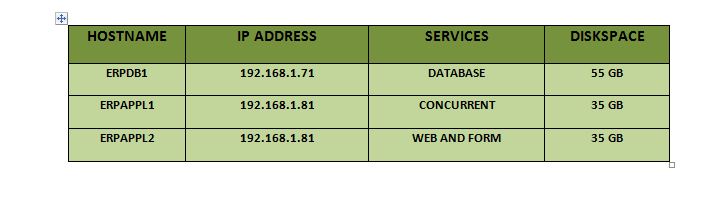
This article demonstrate step by step procedure to install oracle Applications R12.1.1 on multiple Nodes. This article will be helpful for the beginners who want to learn how to Install and configure oracle E-business suite R12.1.1 on multiple nodes using Linux OS platform on their personal computers/laptops and also for those who want to deploy it in Business Enterprise server environment. Multi Node Installation : Oracle E-Business suite is a robust software which provide a very good scalability. You can configure multiple nodes for Installation of E-Business Suite hosting different Services on different Hosts. Such configuration are mainly deploy to balance load and availability. Steps: 1) prepare all OS ore-requisites 2) prepare stage area 3) Install E-business Suite R12.1.1 Software. Hosts information for Installation: Perform all operating system per-requisites on all nodes: ERPDB1 [root@erpdb1 ~]# groupadd dbaerp [root@erpdb1 ~]# useradd -g dbaerp oramgr [root@erpdb1 ~]# passwd...