Using Solaris 11 Live Media in Oracle Virtual Box
This is a step-by-step article for using Oracle Solaris 11 X86 Live Media in Oracle Virtual Box (Vbox).
Steps:
1. Download Oracle Solaris 11 Live Media
2. Create virtual machine for using Live Media
3. Start and configure virtual machine
Step 1: Download Oracle Solaris 11 Live Media
- Download software from Oracle Website
The Live Media provides administrators with an opportunity to explore the Oracle Solaris 11 environment without installing it on a system. The system boots off the media directly allowing administrators to start the installer should they choose to install it to a system.
 Download x86 (821 MB)
-See the First Steps with Oracle Solaris 11 Article for more details
Step 2: Create virtual machine for using Live Media
- steps for creating virtual machine in Vbox


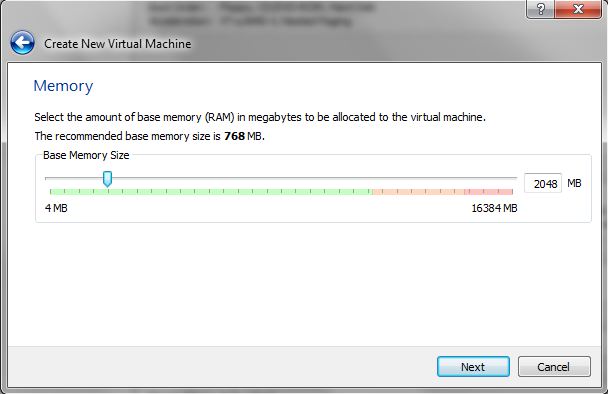
Steps:
1. Download Oracle Solaris 11 Live Media
2. Create virtual machine for using Live Media
3. Start and configure virtual machine
Step 1: Download Oracle Solaris 11 Live Media
- Download software from Oracle Website
Oracle Solaris 11 11/11 Live Media for x86
The Live Media provides administrators with an opportunity to explore the Oracle Solaris 11 environment without installing it on a system. The system boots off the media directly allowing administrators to start the installer should they choose to install it to a system.
Download x86 (821 MB) -See the First Steps with Oracle Solaris 11 Article for more details
Step 2: Create virtual machine for using Live Media
- steps for creating virtual machine in Vbox


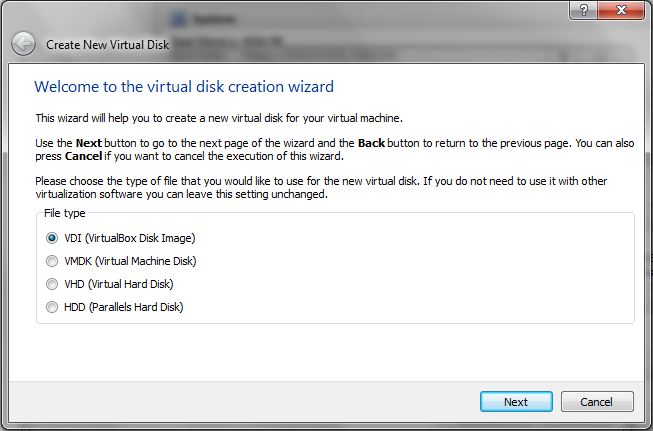


Step 3: Start and configure virtual machine
- Power ON the virtual and follow steps


Comments