Oracle Database 12c Installation failed with Error "network/lib/ins_net_client.mk" on Oracle Solaris 11.2
Installation of Oracle Database 12cR1 on Oracle Solaris 11.2 (X86-64Bit) failed with error "network/lib/ins_net_client.mk" though all pre-requisites checks was successful. Installation failed on the following screen:
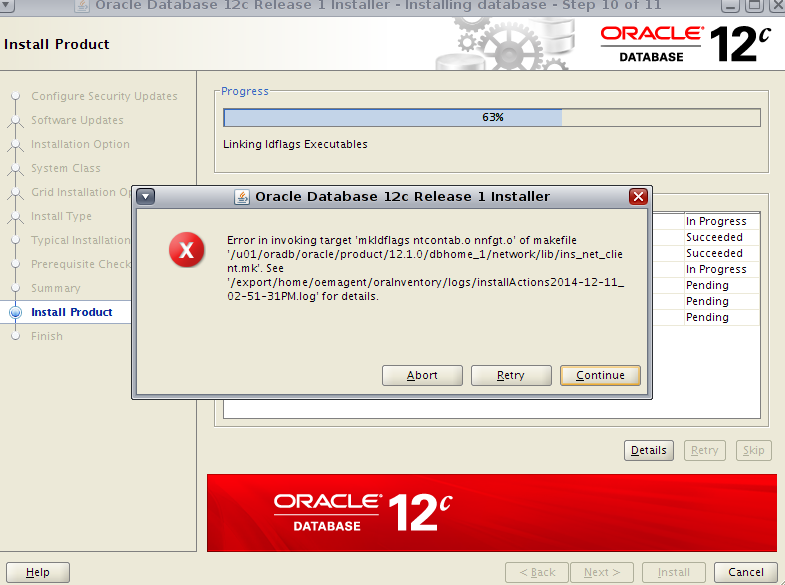
Error log content from the Installation logfile:
Cause:
Installer is not able to find the binary "/usr/ccs/bin/as" in its location.
Solution:
There is a missing package "developer/assembler" in Oracle Solaris 11.2 OS. You actually need not have to abort the Installation. Just Install this missing package and retry Installation it should work.
-The mentioned above package is not Installed on the host. Make sure you have Full IPS repository configured to Install this missing package.
Install pakcage:
After Installation of package the binary is now available and Installer should proceed further without any Issues. Just click on "retry"


- Installation completed successfully without any Issues.
Thanks for reading.
regards,
zaheer
Error log content from the Installation logfile:
INFO: rm -f ntcontab.*

INFO: (if [ "assemble" = "compile" ] ; then \
  /u01/oradb/oracle/product/12.1.0/dbhome_1/bin/gennttab > ntcontab.c ;\
  cc  -c ntcontab.c ;\
  rm -f /u01/oradb/oracle/product/12.1.0/dbhome_1/lib/ntcontab.o ;\
  mv ntcontab.o /u01/oradb/oracle/product/12.1.0/dbhome_1/lib/ ;\
          /usr/ccs/bin/ar rv /u01/oradb/oracle/product/12.1.0/dbhome_1/lib/libn12.a /u01/oradb/oracle/product/12.1.0/dbhome_1/lib/ntcontab.o ; fi)

INFO: (if [ "assemble" = "assemble" ] ; then \
  /u01/oradb/oracle/product/12.1.0/dbhome_1/bin/gennttab > ntcontab.s ;\
  /usr/ccs/bin/as -m64 -Kpic -o ntcontab.o ntcontab.s ;\
  rm -f /u01/oradb/oracle/product/12.1.0/dbhome_1/lib/ntcontab.o ;\
  mv ntcontab.o /u01/oradb/oracle/product/12.1.0/dbhome_1/lib/ ;\
          /usr/ccs/bin/ar rv /u01/oradb/oracle/product/12.1.0/dbhome_1/lib/libn12.a /u01/oradb/oracle/product/12.1.0/dbhome_1/lib/ntcontab.o ; fi)

INFO: sh[2]: /usr/ccs/bin/as: not found [No such file or directory]

INFO: *** Error code 127

INFO: make: Fatal error:
INFO: Command failed for target `
INFO: ntcontab.o
INFO: '
INFO:

INFO: End output from spawned process.
INFO: ----------------------------------
INFO: Exception thrown from action: make
Exception Name: MakefileException
Exception String: Error in invoking target 'mkldflags ntcontab.o nnfgt.o' of makefile '/u01/oradb/oracle/product/12.1.0/dbhome_1/network/lib/ins_net_client.mk'. See '/u01/oradb/oraInventory/logs/installActions2014-12-14_09-04-46AM.log' for details.
Exception Severity: 1
Installer is not able to find the binary "/usr/ccs/bin/as" in its location.
soladmin@soltest2:~$ /usr/ccs/bin/as
bash: /usr/ccs/bin/as: No such file or directory
soladmin@soltest1:~$ ls -lrt /usr/ccs/bin/as
/usr/ccs/bin/as: No such file or directory
soladmin@soltest2:~$
There is a missing package "developer/assembler" in Oracle Solaris 11.2 OS. You actually need not have to abort the Installation. Just Install this missing package and retry Installation it should work.
soladmin@soltest2:~$ pkg info developer/assembler
pkg: info: no packages matching the following patterns you specified are
installed on the system.  Try specifying -r to query remotely:

        developer/assembler
soladmin@soltest2:~$
root@soltest2:~# pkg publisher
PUBLISHER                   TYPE     STATUS P LOCATION
solaris                     origin   online F file:///IPS/
root@soltest2:~# pkg search assembler
INDEX       ACTION VALUE                                          PACKAGE
pkg.fmri    set    solaris/developer/assembler                    pkg:/developer/assembler@0.5.11-0.175.2.0.0.37.0
pkg.summary set    Converts assembler source code to object code. pkg:/developer/assembler@0.5.11-0.175.2.0.0.37.0
root@soltest2:~#
root@soltest2:~# pkg install solaris/developer/assembler

pkg install: The following pattern(s) did not match any allowable packages.  Try
using a different matching pattern, or refreshing publisher information:

	solaris/developer/assembler
root@soltest2:~# pkg install assembler
           Packages to install:  1
       Create boot environment: No
Create backup boot environment: No
DOWNLOAD                                PKGS         FILES    XFER (MB)   SPEED
Completed                                1/1           6/6      0.2/0.2    0B/s

PHASE                                          ITEMS
Installing new actions                         13/13
Updating package state database                 Done
Updating package cache                           0/0
Updating image state                            Done
Creating fast lookup database                   Done
Updating package cache                           1/1
root@soltest2:~#
soladmin@soltest2:~$ pkg info assembler
          Name: developer/assembler
       Summary: Converts assembler source code to object code.
      Category: Development/Other Languages
         State: Installed
     Publisher: solaris
       Version: 0.5.11
 Build Release: 5.11
        Branch: 0.175.2.0.0.37.0
Packaging Date: April 14, 2014 01:02:41 PM
          Size: 625.46 kB
          FMRI: pkg://solaris/developer/assembler@0.5.11,5.11-0.175.2.0.0.37.0:20140414T130241Z
soladmin@soltest2:~$
oracle@soltest2:~$ ls -lrt /usr/ccs/bin/as
-rwxr-xr-x   1 root     bin       632072 Dec 14 09:28 /usr/ccs/bin/as
oracle@soltest2:~$
- Installation completed successfully without any Issues.
Thanks for reading.
regards,
zaheer

Comments
Thanks and keep sharing.
To design this keto diet service, certified nutritionists, personal trainers, and cooks have joined together to develop keto meal plans that are productive, decent, cost-efficient, and satisfying.
From their launch in 2019, hundreds of individuals have already remodeled their body and well-being with the benefits a great keto plan can offer.
Speaking of benefits: in this link, you'll discover eight scientifically-certified ones given by the keto plan.
Thanks in advance